
Get started / Introduction
Introduction
Learn how SuperPlane imports development tickets, runs coding agents and checks their changes.

SuperPlane is an open source software factory for teams. It turns well-defined backlog issues into pull requests ready for review. Coding agents make the changes. SuperPlane coordinates execution, CI checks and feedback. Your team reviews the result and decides what to merge.
When checks fail, the factory sends the details back to the agent for another attempt. Shared rules keep the process consistent, giving engineers more time for work that needs their judgment.

What SuperPlane does?
Section titled “What SuperPlane does?”SuperPlane connects the intake and configure the Factory to listen for matching development issues. The intake automatically imports each issue and records a confidence score from the checks configured by agent. It helps separate bounded work with an observable outcome from work that still needs clarification.

When your team starts a task, SuperPlane dispatches the configured coding agent on a runner. The implementation automation records the run, branch and pull request. The verification automation then evaluates required status checks and pull request feedback. A failed check can return to the agent with its output attached; a passing result proceeds to human review.
For example, an issue that says “Add the YouTube channel to the Community page” can specify the target page, URL, accessible label and required new-tab behavior. SuperPlane can import that issue, run the change, check the link and build and present the resulting pull request with its run history. A person reviews the final diff and decides whether to merge it.
What you can do with SuperPlane?
Section titled “What you can do with SuperPlane?”- Import Intakes : Listen issues from Sentry, linear, GitHub, Notion and more coming with that record a confidence score before execution starts.
- Run coding agents on configured compute: Start an agent with the repository, task context, model, tools and runner settings defined by the Factory.
- Apply verification on every run: Evaluate CI status, repository checks and review feedback before the task reaches a person.
- Connect your engineering stack: Build automations with more than 400 integration components across source control, CI/CD, observability, incident response, cloud infrastructure and AI providers.
- Route failures with evidence: Attach command output, check results and pull request feedback to the next attempt instead of asking an engineer to reconstruct the failure.
- Keep an execution record: Track task state, automation runs, artifacts, cost and the final outcome in a shared workspace.
The software factory adds a process around the agent
Section titled “The software factory adds a process around the agent”A coding agent can inspect a repository, edit files and run commands. The software factory decides when that agent runs, which context and compute it receives, which checks must pass and when the result needs a person.
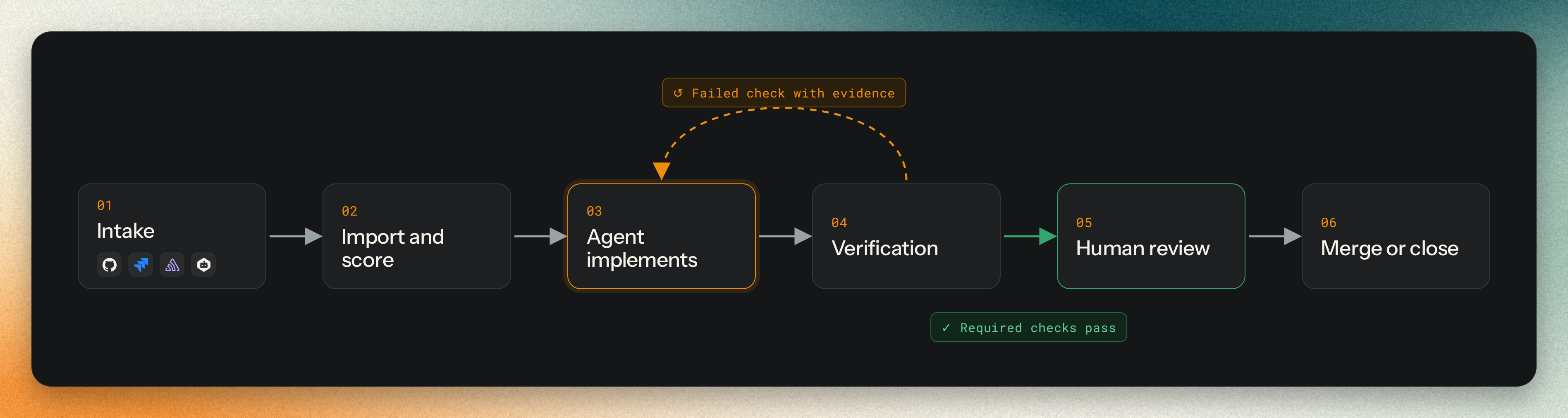
The normal path has one human review after the required automated checks pass. The Factory can pause earlier when a task needs a product, security or scope decision, but those exceptions are not additional review stages in the standard path.
Example: add a YouTube link from a GitHub issue
Section titled “Example: add a YouTube link from a GitHub issue”



How a factory differs from an interactive coding agent?
Section titled “How a factory differs from an interactive coding agent?”A coding agent works on a task. SuperPlane coordinates the process around it: shared instructions, automated checks and a record your team can review.
- Execution environment
- Interactive coding agent sessionYou start and supervise a session on local or remote compute.
- SuperPlane FactoryRuns tasks on configured runners. Your laptop can stay offline.
- Instructions
- Interactive coding agent sessionFollows the prompt, tools and settings supplied for that session.
- SuperPlane FactoryReuses shared automations across tasks. Your team defines how work runs and where it goes next.
- Verification
- Interactive coding agent sessionCan run tests. Session instructions determine which checks run and how failures are handled.
- SuperPlane FactoryRecords required checks and sends failures back with evidence. Passing work moves to human review.
- Continuity
- Interactive coding agent sessionProgress usually lives in the session. Handoffs depend on what you save or share.
- SuperPlane FactoryKeeps task history, outputs and pull requests in one workspace. Teammates can inspect the same record.
- Responsibility
- Interactive coding agent sessionImplements the requested change. You manage the surrounding process.
- SuperPlane FactoryCoordinates intake, implementation and checks. Your team decides whether to merge.
Read Learn how Superplane works to learn how SuperPlane applies this model.
Need help? Share in the community
Section titled “Need help? Share in the community”We would love to hear from you or help you get started. Use these channels to connect with the SuperPlane community.